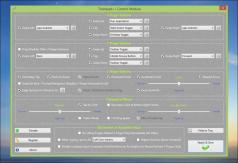


Trackpad++ Driver and Control Module
3.6Trackpad++ Driver and Control Module: The only alternate driver for Apple’s Multitouch Trackpad for Windows
Trackpad++ is the first of its kind driver and it is the sole alternative for using Apple’s Multitouch Trackpad with Microsoft Windows installed on your MacBook Pro or MacBook Air devices.
This driver enables the use of a trackpad in Windows if you decide to switch to Microsoft’s operating system on your MacBook notebook.
What are some of the features and benefits of the Trackpad++ driver?
It greatly expands multi-touch functionality and allows for two, three, and four-finger gestures, including tab, back or forward, zoom in and out, show and hide windows, and even the newly implemented Windows 10 gestures.
Two-finger scrolling capability has been significantly optimized, and it resembles the Mac OS scrolling model, which allows for accelerated or natural touch options.
So-called pointer ballistics are enhanced as well. Trackpad++ allows for two-finger dragging without any bugs or errors and provides the possibility to increase the pointer speed while dragging.
Users can fine-tune options for ignoring any accidental trackpad input during typing sessions and removing accidental drag & drop actions (when you’re dragging tap-style). It also comes with a built-in Control Module, where you can conveniently adjust all of the program’s settings.
Trackpad++ has complete native support for all the latest versions of Windows, including 64-bit Windows 7, Windows 8 and Windows 10.
Download Details
-
License:
Freeware
-
Platform:
Windows
- Publisher:
-
File size:
19.74 Mb
-
Updated:
Jun 13, 2019
-
User Rating:
3.7 / 5 (487 votes)
-
Editors' Review:
Not yet reviewed
-
Downloads:
1,384,533